Showing posts with label Data protector. Show all posts

Tuesday, August 9, 2016

Amazing 9.07, its real bundle, bundled with lots and lots...

Integration with 3PAR Arrays and StoreOnce Backup Systems


As always, there is a large slew of 3PAR and StoreOnce engineering integrations within Data Protector, and this release is no exception – containing no fewer than NINE, including:


VMware incremental GRE, Power-on and Live Migrate from StoreOnce Catalyst: Data Protector users can now power-on, live migrate and perform granular recovery (i.e. recover individual files from within a virtual machine) directly from StoreOnce Catalyst that was previously exclusive to only SmartCache devices and 3PAR Snapshots.


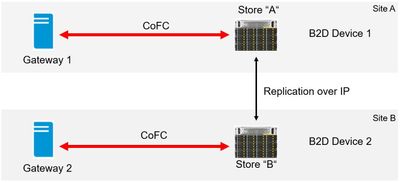
StoreOnce multi-protocol access: Backup data can now be written to a StoreOnce store by either Catalyst over IP (CoIP) or Catalyst over FC (CoFC), giving users the freedom of writing with any of those protocols while reading with another protocol, i.e. write to StoreOnce ’A‘ via CoFC, replicate to StoreOnce ‘B‘ via CoIP, and then read from StoreOnce ‘B’ via CoFC, as below.
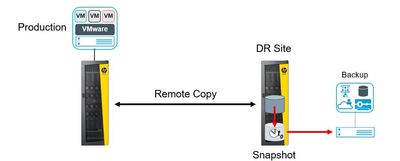


3PAR Remote Copy with VMware / Zero Downtime Backup (ZDB): With the introduction of support for 3PAR remote copy, Data Protector customers who are using ZDB with 3PAR can now take advantage of the advanced technology in both solutions allowing them to move at the storage level their VM snapshots to a secondary array at a DR site, where all of the backup operations can be undertaken without any I/O interruption to the production systems on the production array.

3PAR Port Set/Host Set/Volume Set Support: When working with 3PAR, Data Protector 9.07 sees the introduction of support for Host, Port and Volume Sets. The creation of sets of Hosts, Ports and Volumes makes it much easier when working with complex configurations and is in-line with HPE StoreServ 3PAR best practices.

3PAR Peer Persistence: Peer Persistence makes sure that if 3PAR resources change (paths, ports, array controller, etc) that resource presentation towards server hosts is managed properly.

With Data Protector 9.07, we are continuing to deliver on our commitment to simplify management and add more value to customers that use Data Protector with HPE Storage systems


Enhancements for Virtualized Environments


In Data Protector 9.07 we have also introduced new features for Microsoft Hyper-V and VMware environments:


VMware non-CBT is back: Due to popular demand and also to stay compatible with older VMware systems the Change Block Tracking options are back to be set manually per VM or common selected VM‘s


Individual VHD/VHDX support for Microsoft Hyper-V: Currently in Data Protector 9.06 and earlier versions, Hyper-V virtual machines are backed up as one object, however for restore purposes administrators may want to choose individual virtual disks to be restored from a given VM instead of all virtual disks. With Data Protector 9.07, that problem is solved with the introduction of support for individual .VHD and .VHDX virtual hard disks. We also offer the merging of snapshots for a clean environment after a restore by removing unwanted snapshots that were left in the system.


OpenStack Support

Data Protector 9.07 introduces the support for OpenStack Cinder Volume backups via VMware. Data Protector can now make use of various major components in OpenStack:


SWIFT, which is used mainly as backup target. Supported with previous versions of Data Protector as a backup device type.


CINDER, which can be a source device for backups. This is where Cloud VM‘s store their data during runtime.


NOVA is a compute instance where CINDER volumes are mapped to. The Nova Instance is seen as a VM in VMware, whereas the Cinder volume appears as a Shadow VM under the Nova Instance VM.


Data Protectors supports VMware as the hypervisor for OpenStack Cloud VM‘s where users can backup and restore VMs residing in NOVA or Shadow VMs providing improved integration with OpenStack environments.


In a restore situation Data Protector can bring back the VM on VMware as well as the NOVA instance and CINDER volumes attached to it in the cloud. DP can also register these resources into the OpenStack dashboard. We are very excited about this new feature!


PostgreSQL Support

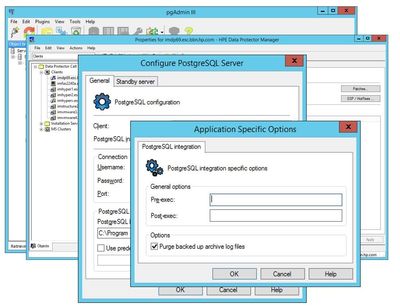
We are adding the support for the backup and recovery of PostgreSQL Enterprise DB databases via the ‘online integration agents’ family, allowing all-encompassing data protection and point-in-time database recovery for all users of PostgreSQL / EnterpriseDB.


This recent addition increases our database backup support to a very comprehensive list including Oracle, MySQL, Microsoft SQL Server, PostgreSQL and more. For detailed information please see the support matrices and integration guides.


NetApp Integration Enhancements

And for the NetApp customers, we are very excited to announce a range of Data Protector integration enhancements, including 3-way NDMP backup and NetApp NDMP Cluster Aware Backup.


A large number of NetApp systems are run in clustered mode which gives the ability for NDMP to fail over to another node or to make use of its resources.


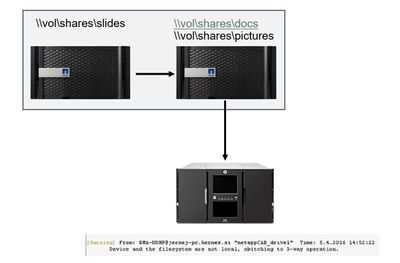
This is why we have introduced an agent to take care of Cluster Aware Backups (CAB), which removes the management overhead from backup/recovery configuration and usage. To use Cluster Aware Backups with NetApp, simply choose ‘NDMP – NetApp CAB’ when adding a new device.


In the example above, a backup is configured for volumes \docs, \pictures and \slides. Volumes are spread over both cluster nodes in this example and the backup device is connected to the right host. Data Protector switches to 3-way backup mode reading the “\slides“ volume from the left node via the right node. In the scenario, Data Protector and Cluster Aware Backup will also take care of the changes (i.e. failover) regarding resources and act appropriately.

Saturday, August 6, 2016

[90:114] Cannot unload medium, target slot (255) appears to be occupied

[Warning] From: BMA@linuxsrv155.com "ESL01_D17"  Time: 2/9/2015 1:13:44 PM
[90:54]   /dev/nst1
Cannot open device (Unit not ready.)

[Major] From: BMA@linuxsrv155.com "ESL01_D17"  Time: 2/9/2015 1:13:55 PM
[90:114]   By: UMA@mediasrv01.com@/dev/rchgr/autoch3
Cannot unload medium, target slot (255) appears to be occupied

Solution:

> The above error is due to DP couldn't unload the media from where it was actually loaded to the drive during backup/restore.

> Move the tape manually from the drive to any free slot using UMA by following the steps below. 

> Login to the media server from where the tape library/autoloader is connected.

>> run devbra-dev, the output will be the drives and exchanger detected from the device manager.

>> copy the scsi path of exchanger (here it is /dev/rchgr/autoch3)
>> execute the below command and move the media to any empty slot.
>uma -ioctl /dev/rchgr/autoch3

/dev/rchgr/autoch3> move D17 S13

> If there are no empty slots available, eject full media to I/O slots and move the media stuck in drive to free slot.
> Then retry the backup, which should be successful.

Hope this helps!

Sunday, July 31, 2016

Orphan object(s) in the backup specification

Warning message from DP

Warning: While reading mount point information, Data Protector found 2 backup object(s), which reference inexistent mountpoint(s) on client system 'winserver123.abc.com'.
Do you want to leave this(these) orphan object(s) in the backup specification?

Reason:

  • Maybe a shared drive that's no longer available on the workstation or were reclaimed.
  • If it exists, it's not accessible by the DP software. In such case the data list needs to be updated/changed on what needs to be backed up.
Solution:
  • Login to the client workstation and check from the Computer Management -> Storage -> Disk Management
  • Check the problematic mountpoint exists and in healthy state. If it doesn't, remove the mountpoint from the backup specification and save it.

Thursday, July 21, 2016

ORA-19588: archived log RECID ***** STAMP ********* is no longer valid

Error log:

RMAN-00571: ===========================================================
RMAN-00569: =============== ERROR MESSAGE STACK FOLLOWS ===============
RMAN-00571: ===========================================================
RMAN-03009: failure of backup command on dev_0 channel at 03/08/2014 07:50:43
ORA-19588: archived log RECID 99528 STAMP 841638632 is no longer valid

Recovery Manager complete.
[Major] From: ob2rman@dbserver01.com "stin"  Time: 03/08/14 07:50:56
External utility reported error.

RMAN PID=12391

[Major] From: ob2rman@dbserver01.com "stin"  Time: 03/08/14 07:50:56
The database reported error while performing requested operation.

RMAN-00571: ===========================================================
RMAN-00569: =============== ERROR MESSAGE STACK FOLLOWS ===============
RMAN-00571: ===========================================================
 RMAN-03009: failure of backup command on dev_0 channel at 03/08/2014 07:50:43
 ORA-19588: archived log RECID 99528 STAMP 841638632 is no longer valid

Recovery Manager complete.

Cause:


-> Archive log backup fails due to invalid/stale archive files which are left uncleared after the backup completion.
-> It can be when there is two consecutive backups happening. For instance, an archive backup gets triggered while there's active full backup. The overlaps would cause this error.

Solution:
Database admin should run "crosscheck archivelog all" to remove the files that were backed up already.

Hope that helps!

Tuesday, July 19, 2016

Restarting DP Cell Manager

How to restart DP cell manager

When the cell manager hangs or any kind of malfunction requires DP cell manager to be reset the following steps could help! 


1. To check the status of cell manager services
/opt/omni/sbin/omnisv –status

2. Run the following cmd to Stop all DP related services (CRS, RDS and MMD)
/opt/omni/sbin/omnisv –stop

3. Double check whether all the services went down
/opt/omni/sbin/omnisv –status

4. Check if any omni related process is running. If not move to next step
Ps –ef |grep omni    ( Command to check any omni processes are in hung status)
kill -9 <PID>            ( kill the process if any using its Process ID)
Ps –ef |grep omni    ( double check and move to next step)

5. Start the cell manager services now

/opt/omni/sbin/omnisv –start

6. Check all the services are up. If not follow steps 2, 3 & 4

/opt/omni/sbin/omnisv –status

7. Once the services are up, run the below command before any backup is triggered after the restart. This will clear all the in-progress sessions that went to hung status during the services restart.

/opt/omni/sbin/omnidbutil –clear

Please use these steps with caution!

Wednesday, July 30, 2014

[81:52] Not a valid mount point => aborting.

[Critical] From: VBDA@winsrv01 "winsrv01 [/G]"  Time: 5/26/2014 9:28:58 AM
[81:52]  /G
                Not a valid mount point => aborting.

An attempt to backup the specific drive (G:/ in this example) connected to the DP client machine was failed and no data will be backed up by DP.

In Windows :

  • Login to the windows client machine and check if the drive is accessible.
  • Check if the drive is local drive or zoned drive and the zoning still exists.

In case the zoned drive no more exists, you can exclude it in the backup spec. 

If the drive exists on the server and it is accessible, try deleting the \tmp folder on the windows client machine and rerun the backup.

Default path to tmp folder for windows 2003/NT/XP:
C:\Program Files\OmniBack\tmp

Default path to tmp for windows 2008:
"C:\ProgramData\Omniback\tmp"

Hope this helps!!!

Sunday, June 22, 2014

[Major] Host for device "ESL01_D01" not found.

[Normal] From: BSM@cellsrv01.in.com "Backupspec_win1"  Time: 3/21/2014 6:04:27 PM
 Backup session 2014/03/21-104 started.

[Major] From: BSM@cellsrv01.in.com "Backupspec_win1"  Time: 3/21/2014 6:04:32 PM
 Host for device ESL01_D01 not found.

[Major] From: BSM@cellsrv01.in.com "Backupspec_win1"  Time: 3/21/2014 6:04:32 PM
 Host for device ESL01_D02 not found.

[Major] From: BSM@cellsrv01.in.com "Backupspec_win1"  Time: 3/21/2014 6:04:32 PM
 Host for device ESL01_D03 not found.

[Normal] From: BSM@cellsrv01.in.com "Backupspec_win1"  Time: 3/21/2014 6:04:32 PM

 Backup Statistics:
         
  Session Queuing Time (hours)         0.00      
  -------------------------------------------    
  Completed Disk Agents ........          0        
  Failed Disk Agents ...........          7        
  Aborted Disk Agents ..........          0        
  -------------------------------------------    
  Disk Agents Total  ...........          7        
  ===========================================    
  Completed Media Agents .......          0        
  Failed Media Agents ..........          0        
  Aborted Media Agents .........          0        
  -------------------------------------------    
  Media Agents Total  ..........          0        
  ===========================================    
  Mbytes Total .................       0 MB      
  Used Media Total .............          0        
  Disk Agent Errors Total ......          0  


This error occurs when the backup device wasn't removed from the devices context following the media server deletion/migration to other cell.

In other words, the media server could have moved to another cell server or might have been decommissioned and by mistake the devices were not removed from the devices list.

Check the media server's existence, if available;
Check the cell server name, it is pointing to;

Mostly, if the orphan device entry is removed, this error will disappear.


Thursday, June 12, 2014

[61:2051] All mountpoints on host \"winsrv01.in.com\" are excluded.

Error:

[Major] From: BSM@cellsrv01.in.com \"win2008bck_spec1\"  Time: 06/09/14 19:09:47
[61:2051] All mountpoints on host \"winsrv01.in.com\" are excluded.
Nothing will be backed up.

Reason:

>> This is something related to Inet error (which was discussed Here), but not necessarily be due to network disruptions. This could also be due to platform side issue.

Analysis:

>> Try to ping and telnet the windows server using default port number from cell server or any other server on the same network.

>> In this case, the server was pretty slow and non-responsive. Telnet to the default port was hung, so requested wintel team for server optimization which must fix the error.

>> Double-check by expanding the server's objects from the backup specification (which would hung as well).

Have a Great Day :)

Tuesday, April 22, 2014

[90:1004] Device address not found.

[Normal] From: BSM@cellsrv01.in.com "Backup_Spec_Win1"  Time: 4/16/2014 12:08:46 PM
 Backup session 2014/04/16-256 started.

[Normal] From: BMA@winsrv01.in.com "AUT01_D01"  Time: 4/16/2014 12:08:55 PM
 STARTING Media Agent "AUT01_D01"

[Normal] From: BMA@winsrv01.in.com "AUT01_D01"  Time: 4/16/2014 12:09:01 PM
 By: UMA@winsrv01.in.com@Changer0:7:0:1
 Loading medium from slot 8 to device Tape1:7:0:0C

[Warning] From: BMA@winsrv01.in.com "AUT01_D01"  Time: 4/16/2014 12:09:57 PM
 The device "AUT01_D01" could not be opened("Device could not be accessed")

[Normal] From: BMA@winsrv01.in.com "AUT01_D01"  Time: 4/16/2014 12:09:57 PM
 Starting the device path discovery process.

[Critical] From: BMA@winsrv01.in.com "AUT01_D01"  Time: 4/16/2014 12:10:00 PM
[90:1004]  Device address not found.

[Normal] From: BMA@winsrv01.in.com "AUT01_D01"  Time: 4/16/2014 12:10:00 PM
 Device path discovery process finished.

[Normal] From: BMA@winsrv01.in.com "AUT01_D01"  Time: 4/16/2014 12:10:00 PM
 By: UMA@winsrv01.in.com@Changer0:7:0:1
 Unloading medium to slot 8 from device Tape1:7:0:0C

[Normal] From: BMA@winsrv01.in.com "AUT01_D01"  Time: 4/16/2014 12:10:39 PM
 ABORTED Media Agent "AUT01_D01"

[Normal] From: BSM@cellsrv01.in.com "Backup_Spec_Win1"  Time: 4/16/2014 12:10:39 PM

 Backup Statistics:
         
  Session Queuing Time (hours)         0.00      
  -------------------------------------------    
  Completed Disk Agents ........          0        
  Failed Disk Agents ...........          4        
  Aborted Disk Agents ..........          0        
  -------------------------------------------    
  Disk Agents Total  ...........          4        
  ===========================================    
  Completed Media Agents .......          0        
  Failed Media Agents ..........          1        
  Aborted Media Agents .........          0        
  -------------------------------------------    
  Media Agents Total  ..........          1        
  ===========================================    
  Mbytes Total .................       0 MB      
  Used Media Total .............          0        
  Disk Agent Errors Total ......          0  


Troubleshooting steps as follows:

>> Logged into the media server and checked for devices claimed in Device Manager. Found the devices.
>> Ran devbra -dev to determine the SCSI address.
>> Found N/A for drive

C:\>devbra -dev

Exch    HP:1x8 G2 AUTOLDR  Path: "Changer0:0:0:1"  SN: "AABBCCDD1E"
        Description: CLAIMED:HP StorageWorks 1x8 Cartridge Autoloader
        Revision: 4.20  Flags: 0x0016  Slots: 8  Drives: 1
        Drive(s) SN:
                "ABCDEFGHIJ"

Tape    HP:Ultrium 3-SCSI  Path: "Tape0:0:0:0"  SN: "N/A"
        Description: CLAIMED:HP LTO3 Drive
        Revision: Q51W  Device type: lto [13]  Flags: 0x0011

>> Checked if the drive is locked by DP

[root@cellsrv01:/root]
# omnimm -show_locked_devs | grep AUT01_D01

[root@ cellsrv01:/root]

>> Stopped DP Inet from Services.msc and Ran LTT.
>> Got error message that "mma.exe" process is accessing the device. Killed the mma.exe process from the Task Manager.

>> rescanned the devices in LTT. Able to detect both autoloader and it's drive this time.

>> Ran devbra -dev, which got the SCSI address.

C:\>devbra -dev

Exch    HP:1x8 G2 AUTOLDR  Path: "Changer0:7:0:1"  SN: "AABBCCDD1E "
        Description: CLAIMED:HP StorageWorks 1x8 Cartridge Autoloader
        Revision: 4.20  Flags: 0x0016  Slots: 8  Drives: 1
        Drive(s) SN:
                "ABCDEFGHIJ "

Tape    HP:Ultrium 3-SCSI  Path: "Tape1:7:0:0C"  SN: "ABCDEFGHIJ "
        Description: CLAIMED:HP LTO3 Drive
        Revision: Q51W  Device type: lto [13]  Flags: 0x0011

>> Ran the backup successfully.

Cause :

The DP media agent was accessing the drive and didn't let any other process to send commands. After the hung process is killed, the drive was accessible for normal operations.


Sunday, April 13, 2014

[61:12500] cannot connect to inet for getting file system list on host

Error:

[Critical]   From: BSM@cellsrv01.in.com "backup_spec_01” Time: 8/16/2014
[
61:12500] cannot connect to inet for getting file system list
              on host" winclnt01.in.com".
 
Reason:

Host may be down or Data protector client services (Inet) down.


Troubleshooting steps for Windows clients are as follows:

1. Check if the client (i.e. winclnt01.in.com in above error) is pingable from the cell manager, if not check the issue with platform team.

2. If the server is pingable, telnet the client using port 5555 (eg: #Telnet <Client name> 5555)

3. If the telnet failed, login to the windows client and check whether “Data protector Inet” service is running or not. If not start the “Data Protector Inet” service, Just by right clicking the service and restart it.

4. If the Data protector service is not listed in the “services.msc”, the DP agent might be removed from the client. Push the DP agents on this client from cell server.

5. If the telnet failed using port 5555 even data protector service running, check with platform team to open the port.

Troubleshooting steps for UNIX clients are as follows:

1. Follow the steps 1 and 2 as explained above.

2. If the telnet failed, login to the UNIX client and check for the Omni entries in /etc/services and /etc/inetd.conf using the commands below. If not found, DP client needs to be reinstalled.

[root@unxclnt01:/root]
# egrep omni /etc/services
omni  5555/tcp     # DATA-PROTECTOR

[root@unxclnt01:/root]
# egrep omni /etc/inetd.conf
omni stream tcp nowait root /opt/omni/lbin/inet inet -log /var/opt/omni//log/inet.log

3. Check if the port 5555 is listening using the command below. If not, raise a request to platform team to enable the port and start the inetd daemon.

[root@unxclnt01:/root]
# netstat -an | grep 5555
tcp        0      0  *.5555                 *.*                     LISTEN

4. Check if the ‘inetd’ daemon is running, if not start it using the below commands:

[root@unxclnt01:/root]
# ps -ef | grep inetd
    root  2144     1  0  Aug 10  ?         7:20 /usr/sbin/inetd

# /etc/inetd –s


Tuesday, April 1, 2014

Virtual Device Interface reported error: The object was not open.

Backup of SQL Database fails with the following errors:

[Critical] From: OB2BAR_Main@sqlsrv01.in.com "SIDDBS01"  Time: 3/9/2014 6:31:55 PM
 Error has occurred while executing a SQL statement.
 Error message: 'SQLSTATE:[08004] CODE:(911) MESSAGE:[Microsoft][ODBC SQL Server Driver][SQL Server]Database 'DBN01' does not exist. Make sure that the name is entered correctly.
SQLSTATE:[42000] CODE:(3013) MESSAGE:[Microsoft][ODBC SQL Server Driver][SQL Server]BACKUP DATABASE is terminating abnormally.'

[Critical] From: OB2BAR_Main@sqlsrv01.in.com "SIDDBS01"  Time: 3/9/2014 6:31:55 PM
 Virtual Device Interface reported error:
The object was not open.

 See also Data Protector debug.log and SQL Server error log for details.

[Normal] From: OB2BAR_DBN01@sqlsrv01.in.com "SIDDBS01"  Time: 3/9/2014 6:31:57 PM
 Completed OB2BAR Backup: sqlsrv01.in.com:/SIDDBS01/DBN01/0 "MSSQL"

[Major] From: OB2BAR_DBN01@sqlsrv01.in.com "SIDDBS01"  Time: 3/9/2014 6:31:57 PM

Aborting connection to BSM. Abort code -2.

Solution:

>> Remove the DB 'DBN01' from backup spec, if it doesn't exists in the SQL server.

[OR]

>> Check if the DB was dismounted, If so mount the database 'DBN01' and bring it online.

Trigger the backup and see if it's successful.

Friday, March 28, 2014

[90:801] Active Removable Storage Manager (RSM) service found on local system.

[Normal] From: BMA@mediasrv01.in.com "MSL2024_D02"  Time: 3/23/2014 2:57:16 PM
 STARTING Media Agent "MSL2024_D02"

[Warning] From: BMA@mediasrv01.in.com "MSL2024_D02"  Time: 3/23/2014 2:57:16 PM
[90:801]  Active Removable Storage Manager (RSM) service found on local system.

 [Warning] From: UMA@mediasrv01.in.com "MSL2024"  Time: 3/23/2014 2:57:18 PM
[90:59]   Changer0:0:0:0
 Cannot open exchanger control device ([2] The system cannot find the file specified. )

[Warning] From: UMA@mediasrv01.in.com "MSL2024"  Time: 3/23/2014 2:57:18 PM
 The device "MSL2024" could not be opened ("Device could not be accessed") 

[Normal] From: UMA@mediasrv01.in.com "MSL2024"  Time: 3/23/2014 2:57:18 PM
 Starting the device path discovery process. 

[Warning] From: UMA@mediasrv01.in.com "MSL2024"  Time: 3/23/2014 2:57:19 PM
[90:59]   Changer0:0:0:0
 Cannot open exchanger control device ([2] The system cannot find the file specified. )
[Normal] From: BMA@ mediasrv01.in.com "MSL2024"  Time: 3/23/2014 2:57:21 PM ABORTED Media Agent " MSL2024_D02"

Solution:

Removable Storage Manager (RSM) service on MS Windows 2003 might cause device issues in backup environment.

It is recommended to stop and disable the RSM service on all MS Windows 2003 systems.

RSM Service in Started status

Thursday, March 27, 2014

[61:2015] Timeout waiting for the devices to get free.

[Critical] From: BSM@cellsrv01.in.com "cellsrv01_IDB"  Time: 02/27/14 02:00:31
[61:2015]  Timeout waiting for the devices to get free.
The session will terminate.

Ø  It is very common in every backup environment to share the same device for different backups. This is an error message due to device contention issue.

Ø  The backup device selected in the backup specification is unavailable for the backup to start. It is in use by another process or by another backup/restore/copy sessions.

Ø   Check the device status using the lock name. (Check Here for the commands used to find a locked device). Wait for the device to be free.

Ø  The backup will be queued for global timeout seconds and will fail if no device is freed / allocated to the backup session.

Ø  The queuing time can be found at the end of backup session from backup statistics. Shown below
  

Backup Statistics:
          
                   Session Queuing Time (hours)         0.00        
                   -------------------------------------------      
                   Completed Disk Agents ........          5          
                   Failed Disk Agents ...........          0          
                   Aborted Disk Agents ..........          0          
                   -------------------------------------------      
                   Disk Agents Total  ...........          5          
                   =====================================     
                   Completed Media Agents .......          1          
                   Failed Media Agents ..........          0          
                   Aborted Media Agents .........          0          
                   -------------------------------------------      
                   Media Agents Total  ..........          1          
                   ===========================================      
                   Mbytes Total .................   17985 MB        
                   Used Media Total .............          1          
                   Disk Agent Errors Total ......          0    


Tuesday, March 25, 2014

[90:63] Cannot load exchanger medium (Medium error.)

[Normal] From: BMA@winsrv01.in.com "MSL_D01"  Time: 3/24/2014 10:53:43 PM
 By: UMA@winsrv01.in.com@Changer0:0:0:0
 Loading medium from slot 9 to device Tape0:0:0:0

[Major] From: BMA@winsrv01.in.com "MSL_D01"  Time: 3/24/2014 11:03:16 PM
[90:63]   By: UMA@winsrv01.in.com@Changer0:0:0:0
 Cannot load exchanger medium (Medium error.)

[Normal] From: BMA@winsrv01.in.com "MSL_D01"  Time: 3/24/2014 11:03:16 PM
 ABORTED Media Agent "MSL_D01"

[Normal] From: BMA@winsrv01.in.com " MSL_D02"  Time: 3/24/2014 11:03:21 PM
 STARTING Media Agent " MSL_D02"

[Normal] From: BMA@winsrv01.in.com " MSL_D02"  Time: 3/24/2014 11:03:26 PM
 By: UMA@winsrv01.in.com@Changer0:0:0:0
 Loading medium from slot 9 to device Tape1:0:0:0

[Major] From: BMA@winsrv01.in.com " MSL_D02"  Time: 3/24/2014 11:13:10 PM
[90:63]   By: UMA@winsrv01.in.com@Changer0:0:0:0
 Cannot load exchanger medium (Medium error.)

[Normal] From: BMA@winsrv01.in.com " MSL_D02"  Time: 3/24/2014 11:13:10 PM
 ABORTED Media Agent " MSL_D02"


Solution:

Exchanger medium is failing while handling media from particular slot (here it is slot 9). The media has errors that is residing slot 9.

Move to 'Devices & Media' context -> Click Library -> Click Slot -> move to Slot 9.

--- Check the status of media in slot 9.

--- It was poor media. Isolate the media by moving it to separate media pool and unload it from library. Wait for the media to expire and reformat it. If the status is still shows poor even after formatting, it is not advisable to use it henceforth.

--- Clean the affected drives with good cleaning tape and run a test backup. They should be good for backups.